Fact.pt
Fact.pt provider — identifier factpt. Verified against a real Fact.pt sandbox
account.
Setting up Fact.pt
In Fact.pt
- Create an API key in Fact.pt's Backoffice. The key is tied to one document series.
- Make sure that series has 8 decimal places of precision. The plugin sends net unit prices
with several decimals so that invoices add up to the cent; a 2-decimal series rejects them
(
price: Trying to use an item having more than 2 decimal digits, in an incompatible series.). - For testing, do the same in the sandbox. Sandbox and production tokens are different.
In pretix
Open the event's Settings → Invoicing (PT), click the Fact.pt card, and fill in its section. To use one token for all of an organizer's events, fill it in on the organizer's Settings → Invoicing (PT) instead; see Organizer-wide settings.
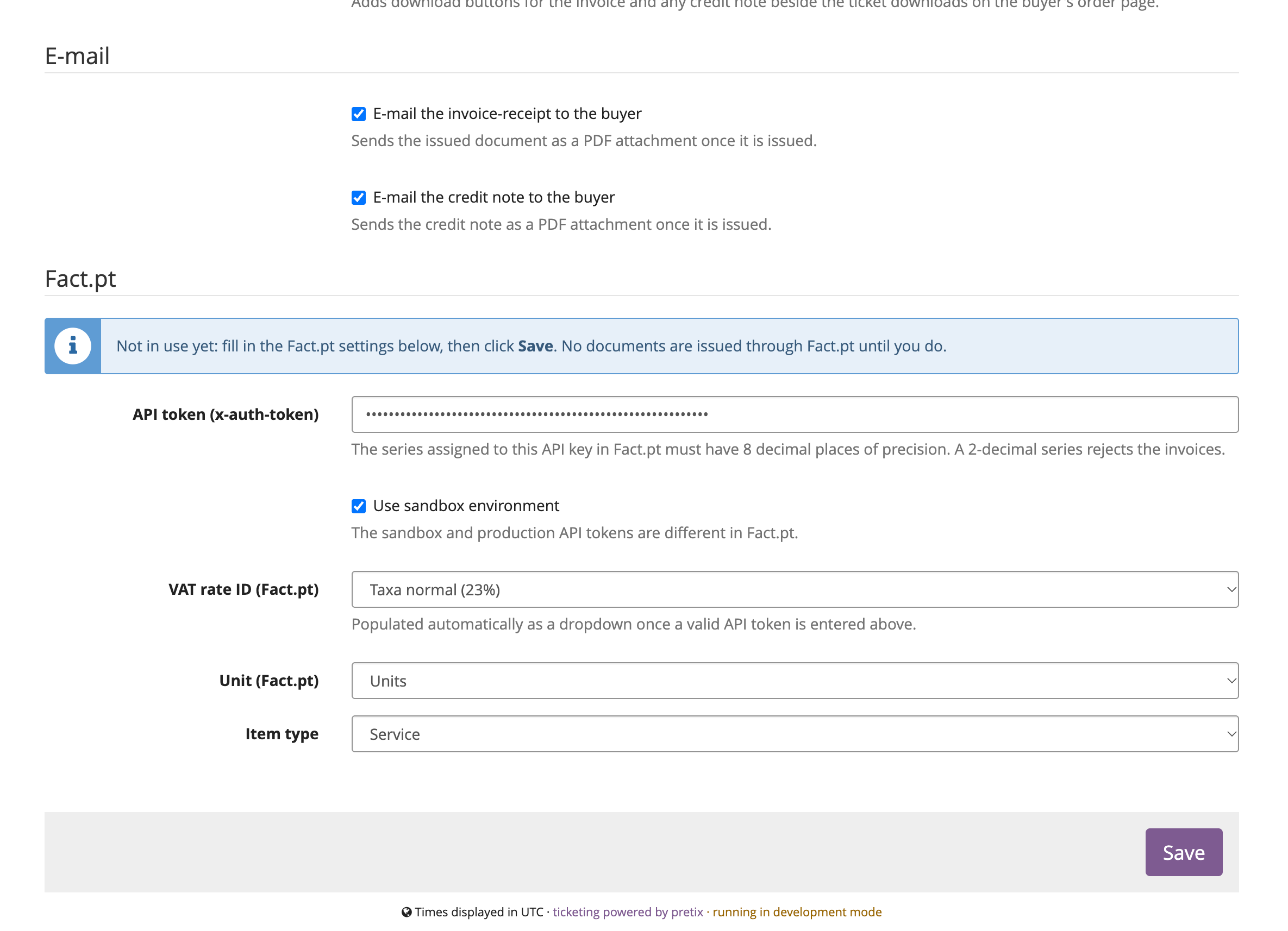
- Paste the API token (x-auth-token).
- Tick Use sandbox environment while testing. Untick it, and paste the production token, when going live.
- VAT rate ID (Fact.pt) turns into a dropdown of your account's active rates as soon as the token is valid. Pick the rate pretix charges on the event's tickets; see The VAT rate must match pretix.
- Pick a Unit and an Item type. For tickets, Units and Service are the usual choice.
- Press Save. The Not in use yet notice disappears, and paid orders are invoiced from now on.
Settings
| Setting | Description |
|---|---|
| API token (x-auth-token) | Your Fact.pt API token. Its series must have 8 decimal places. |
| Use sandbox environment | Issue against api.sandbox.fact.pt. Sandbox and production tokens are different. |
| VAT rate ID (Fact.pt) | Dropdown of your account's active tax rates, loaded live once the token is valid. Applied to every line. |
| Unit (Fact.pt) | Units / Meters / Boxes / Kilograms / Liters. |
| Item type | Service or Product. |
The VAT rate must match pretix
Fact.pt receives each line's net price and adds its configured rate on top. If that rate differs from what pretix charged, the document would be for an amount the buyer never paid (e.g. a €15.00 ticket with no tax rule in pretix, invoiced at 23%, becomes €18.45).
So before every issuance the plugin checks the configured rate against each line's pretix tax rate and refuses with an explicit error on a mismatch:
VAT mismatch: pretix charged 0% on this order but the configured Fact.pt rate is 23%
(Taxa normal (23%)). The invoice would be issued for the wrong amount. Fix the event's
tax rule or the Fact.pt VAT rate setting.
Fix the tax rule or the setting, then press Retry.
Note
One VAT rate per event: an event selling items at different rates can't be invoiced yet. See Known limitations.
Clients
- With a NIF — an existing Fact.pt client with exactly that NIF is reused. Otherwise one is created (or updated, if Fact.pt already has that NIF) from the order's invoice address.
- Without a NIF — an existing final-consumer client with the same name is reused; otherwise
Fact.pt creates one under
999999990. A buyer with no name or company is filed as "Consumidor Final".
A Portuguese address without a postal code is sent with 0000-000, which Fact.pt accepts where an
empty code is rejected. Address fields are collapsed to one line and cut to Fact.pt's limits.
Duplicate clients
If several Fact.pt clients share the buyer's NIF, issuance stops with
Multiple clients with same tin. Specify an ID. The plugin won't guess which one to invoice:
merge the duplicates in Fact.pt's Backoffice and retry.
A client created or updated from pretix overwrites that NIF's record in Fact.pt with the order's address data.
Duplicate protection and retries
Each document carries an identifierId (pretix-<event>-<order code>), and Fact.pt rejects a second
document with the same one. That is what makes retries safe: a network failure (timeout, Fact.pt
unreachable) is retried automatically, up to three times a couple of minutes apart, and if the
first call had actually landed, the retry bounces instead of issuing twice. The row reads retrying
automatically in a few minutes meanwhile, and gave up after several attempts if every retry
failed; press Retry then.
If the first call did land, the document exists in Fact.pt but pretix never got its number. On any
retry, automatic or by hand, the plugin therefore first looks through the documents issued since
that attempt for one with the order's identifierId and links it to the order. See
Known limitations for how far back that search goes.
A rejection (bad token, VAT mismatch, invalid data) is never retried automatically: fix the cause, then press Retry.
An order paid again after a refund gets a new identifier per
new invoice (…-r1, …-r2), and each credit note uses its invoice's plus -credit.
Credit notes
Issued with Fact.pt's credit endpoint, crediting the original document in full. Fact.pt allows exactly one credit note per document, for its full amount.
Documents and numbers
The number shown in pretix (e.g. 2025QG/9) is the one Fact.pt returns for the document. Rows
issued through Fact.pt also offer Open at Fact.pt, a link to the document's permanent page.