Moloni
Moloni provider — identifier moloni. Issuing invoice-receipts and credit
notes, and downloading their PDFs, has been verified against a real Moloni account.
Setting up Moloni
In Moloni
- In Moloni's developer area, create an application. Note its Developer ID (client_id) and Client secret.
- Register the plugin's redirect URI on that application. It is shown (with a Copy button)
on the plugin's settings page and is the same for every event and organizer:
https://<your pretix domain>/control/ptinvoicing/moloni/callback/. - In the company you'll invoice from, make sure you have a document series for invoice-receipts and a separate one for credit notes (a Moloni series is bound to one document type), plus at least one payment method and one maturity date ("Pronto pagamento").
In pretix
Open the event's Settings → Invoicing (PT) and click the Moloni card. To set Moloni up once for all of an organizer's events, do the same on the organizer's Settings → Invoicing (PT) instead; see One connection for every event.
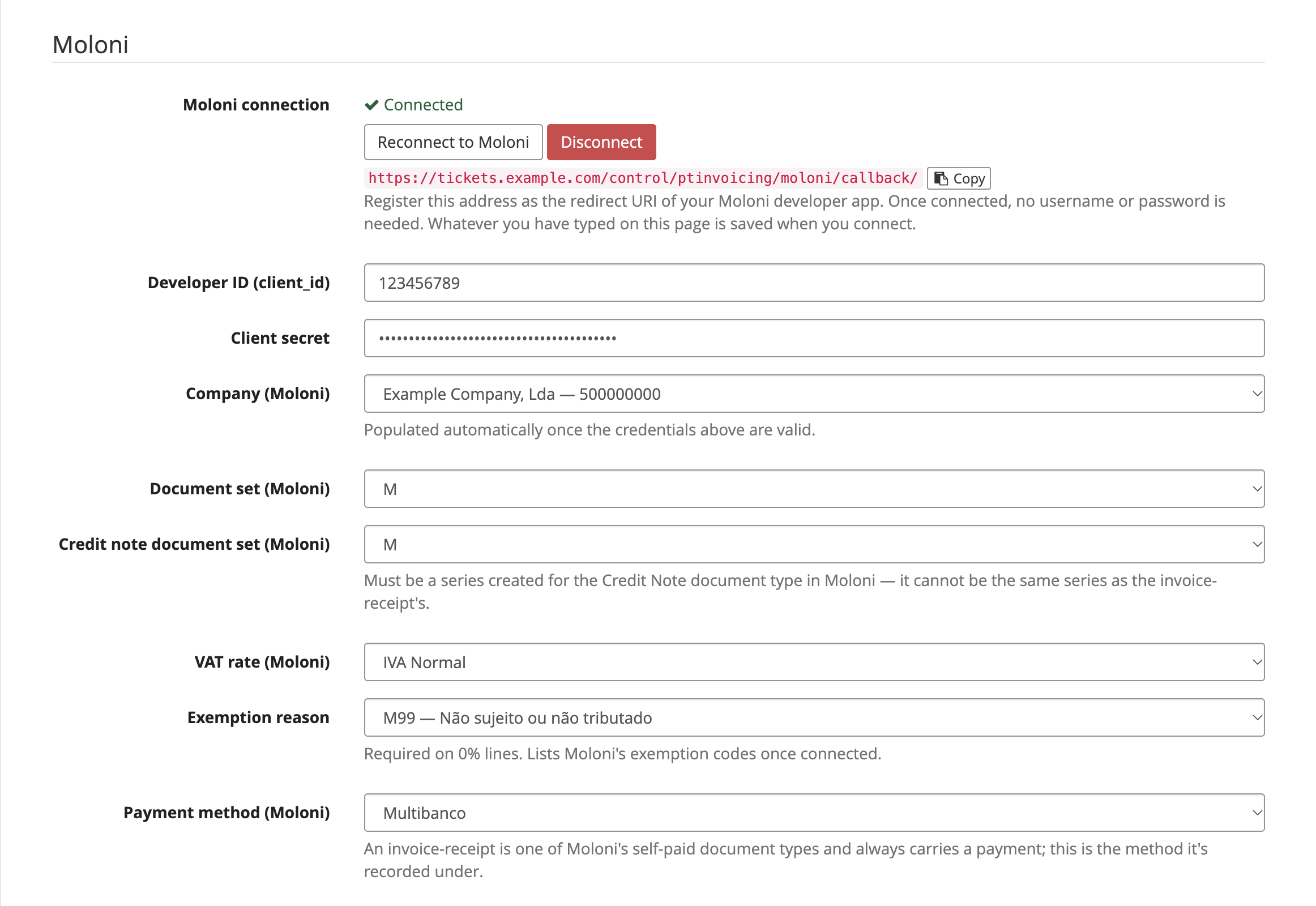
- Fill in the Developer ID (client_id) and Client secret.
- Press Connect to Moloni. You're sent to Moloni to authorize the application, then brought back to this page. Whatever you had typed is saved on the way; there's no need to save first. Once back, the panel shows Connected with Reconnect to Moloni and Disconnect buttons.
- Pick the Company. With several companies in the account you must pick one explicitly; each option shows the name and NIF. The remaining dropdowns load for that company.
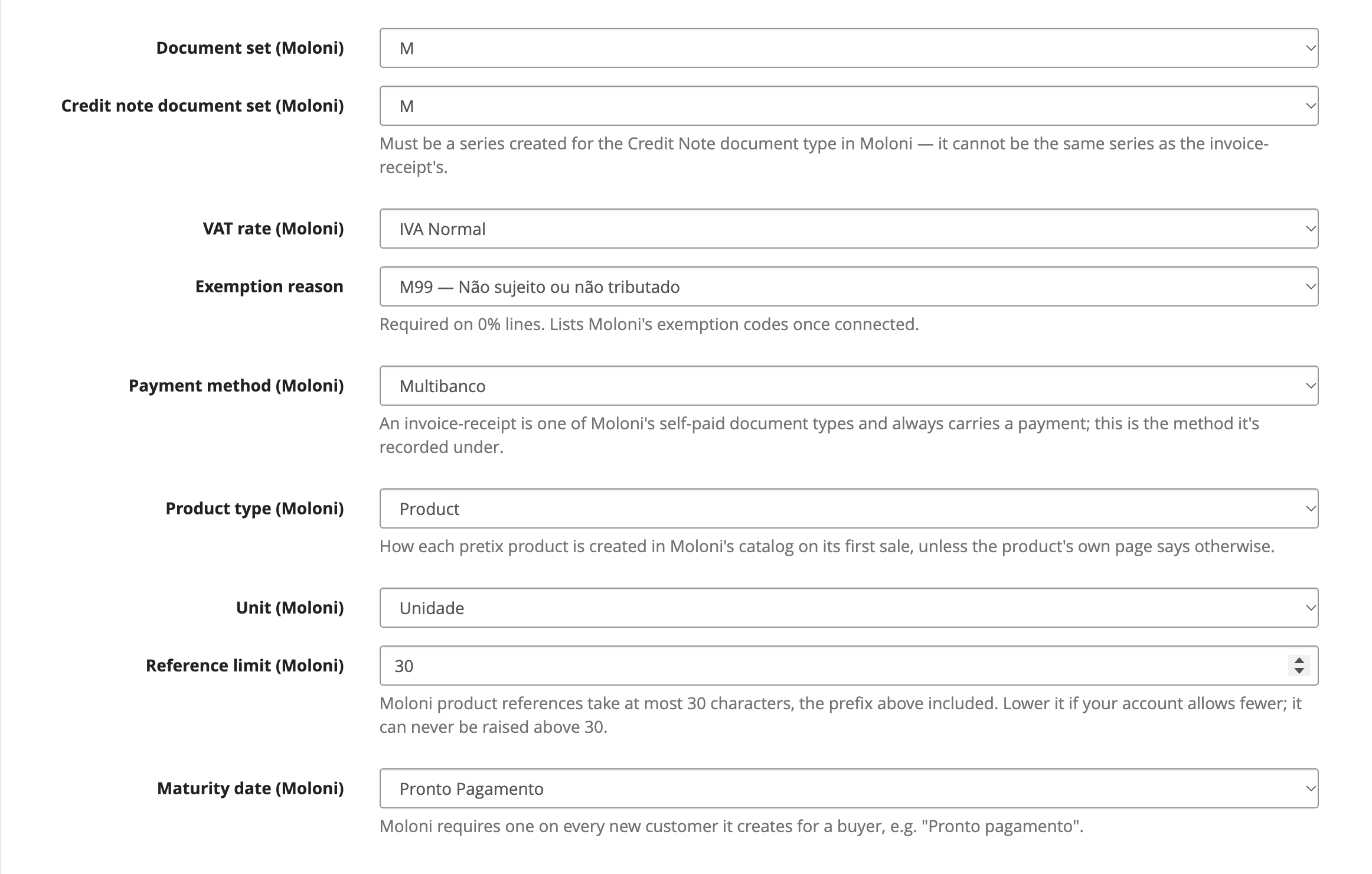
- Pick the Document set for invoice-receipts and the Credit note document set. They must be different series, the latter created for the Credit Note document type.
- Pick the VAT rate pretix charges on the tickets, and an Exemption reason if any ticket is sold at 0%. See Taxes.
-
Pick the default Payment method, a Maturity date, and the Product type and Unit that the plugin's catalog products are created with. See Products.
-
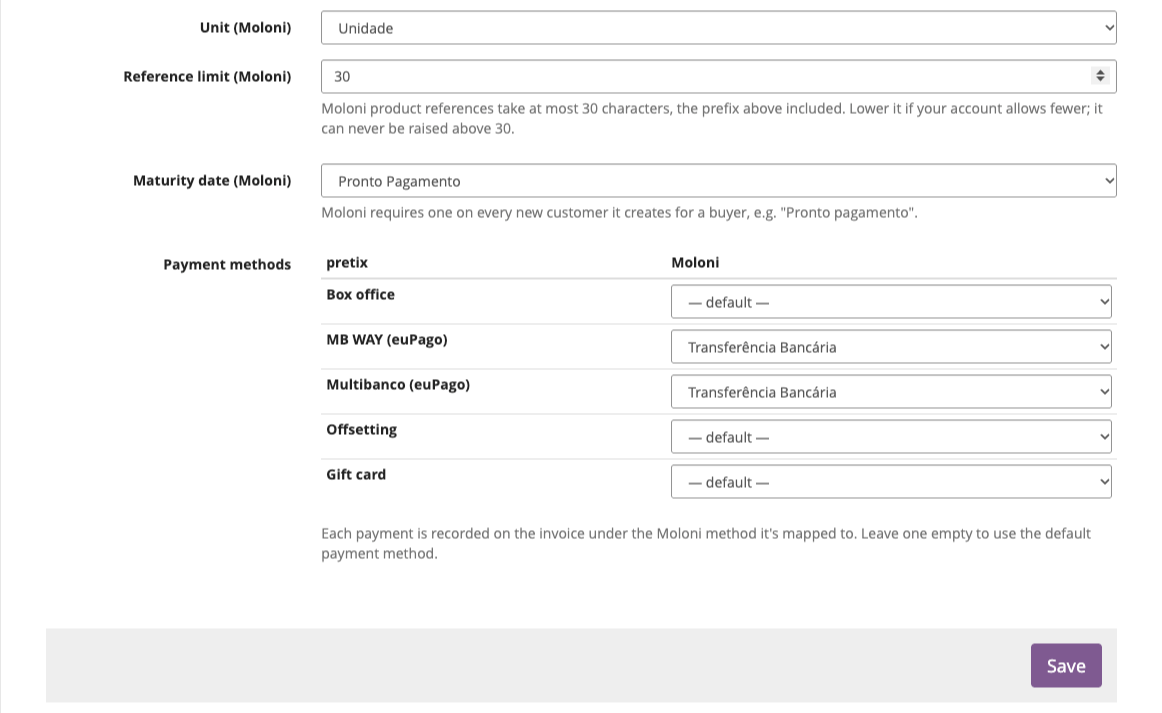
Optionally map each pretix payment method to a Moloni one in the Payment methods table. See Payment methods.
-
Press Save. Until you do, the section says Not in use yet and nothing is issued.
The connection
Connect to Moloni uses Moloni's authorization-code flow: no Moloni password is stored, only the access and refresh tokens. The refresh token expires after 14 days without use, so the plugin refreshes every connection once a day, and a quiet event never loses it.
If Moloni refuses a refresh, the connection is marked expired: the settings page says so, the order panels warn that nothing can be issued, and the event's contact e-mail (pretix Settings → General) gets a message with a link to reconnect. Press Reconnect to Moloni.
Disconnect asks for confirmation first, since without a connection no document can be issued for the event.
Username and password
Still accepted as an alternative to Connect to Moloni, and hidden while connected. With them set, an expired connection logs in again by itself instead of waiting for you to reconnect.
One connection for every event
Press Connect to Moloni on the organizer's Settings → Invoicing (PT) and every event of that organizer issues through that connection, with the company, series and other settings saved there. Nothing has to be connected per event; see Organizer-wide settings for how events inherit.
On such an event's settings page:
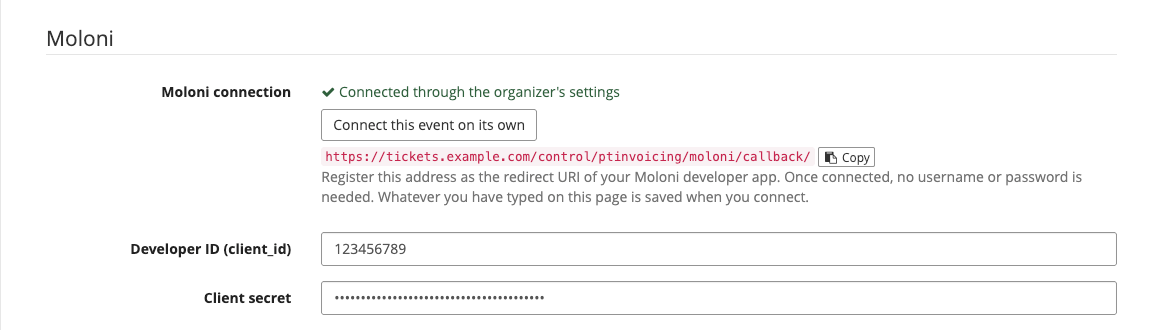
- the panel reads Connected through the organizer's settings, and there is no Disconnect button, since the connection isn't the event's to remove;
- Connect this event on its own gives the event a connection of its own (another Moloni account, for example). The organizer's connection, and every other event, is left untouched. Disconnect on that event later removes only its own connection, and it uses the organizer's again;
- the payment methods table is still filled in per event.
A shared connection is refreshed once a day for the organizer, not once per event. If it expires, each event's page says that the organizer's connection has expired and links to the organizer's page, where Reconnect to Moloni restores it for all of them. The warning e-mail goes to the contact e-mail of the events using it, once per address.
Settings
Most fields turn into dropdowns filled from your Moloni account once you're connected. The company-specific ones load after you pick a Company.
| Setting | Required | Description |
|---|---|---|
| Developer ID (client_id) | yes | From Moloni's developer area. |
| Client secret | yes | From Moloni's developer area. |
| Moloni username / password | no | Only without Connect to Moloni; see above. |
| Company | yes | With several companies in the account you must pick one explicitly. Each option shows the name and NIF. |
| Document set | yes | Series used for invoice-receipts. |
| Credit note document set | yes | A series created for the Credit Note document type. It can't be the invoice-receipt's series. |
| VAT rate | for taxed tickets | Must be the same rate pretix charges; see Taxes. |
| Exemption reason | for 0% tickets | Moloni's exemption codes, e.g. M07 (Artigo 9.º do CIVA). |
| Payment method | yes | Invoice-receipts always carry a payment; this is the method it's recorded under when a pretix payment method has no mapping of its own. |
| Product type | yes | Service (default), Product or Other: what catalog products are created as, unless the product's own page says otherwise. See Products. |
| Unit | yes | The products' unit of measure. |
| Reference limit | no | How long a product reference may be in Moloni, prefix included. Defaults to 30, Moloni's maximum; lower it if your account allows fewer. |
| Maturity date | yes | Set on each new Moloni customer, e.g. "Pronto pagamento". |
| Payment methods (table) | no | One row per payment method the event accepts; see Payment methods. Not shown on an organizer's page. |
Payment methods
Moloni records a payment on every invoice-receipt. The Payment methods table lists each payment method the event accepts (Multibanco, MB WAY, bank transfer, box office…) and lets you pick the Moloni payment method it is recorded under. A row left at default uses the Payment method setting above.
An order paid through several methods gets one payment entry per method, with its amount. An order marked as paid by hand in the Control panel is recorded under the method of its latest other payment attempt (a Multibanco reference that was paid but never confirmed automatically counts as Multibanco).
Products
Moloni only invoices products from its catalog, so each pretix product gets one, created automatically on its first sale and reused from then on. Moloni's sales reports therefore stay per ticket type. Each line on the document still shows the pretix product name and the price actually paid.
Reference. A catalog product is found by its reference: the Product reference prefix from
the general settings (pretix- by default) followed by the product's own reference.
- Without one of its own, a product's reference is
item-<id>, givingpretix-item-<id>. Each fee type (payment fee, shipping…) gets a product too,pretix-fee-<type>. -
To choose it, open the product in pretix: its page has an Invoicing (PT) tab with a Product reference field.
VIPthere makes the catalog referencepretix-VIP. Two products of one event can't share a reference, and the shapesitem-<number>andfee-…are reserved.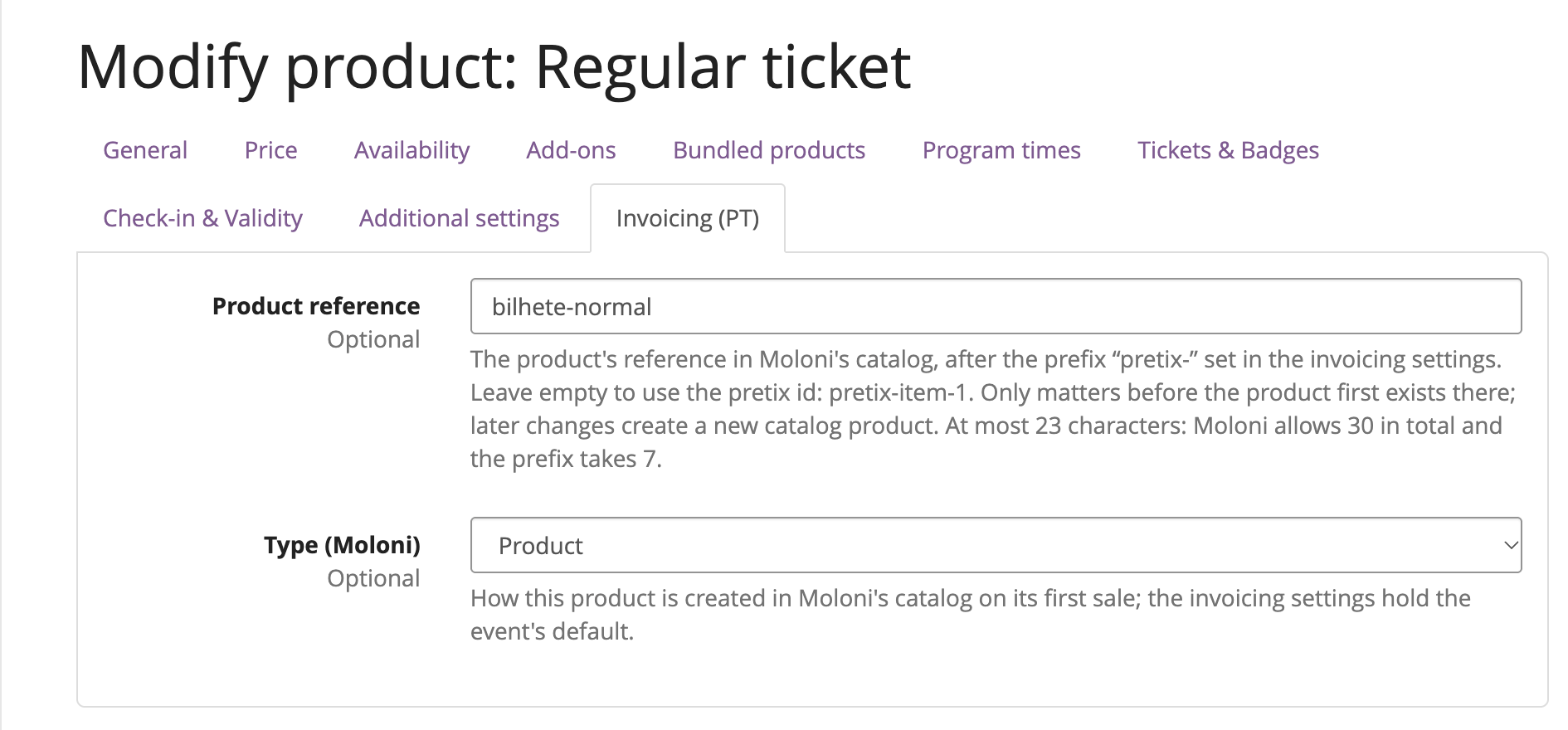
-
Prefix and reference together may be at most 30 characters (the Reference limit setting). The settings page shows how many are left for the reference as you type the prefix, and refuses a prefix that leaves fewer than 12. A reference that is too long stops issuance with an error naming the product, before anything is created in Moloni.
- A reference only matters until the product exists in Moloni. Changing it, or the prefix, later makes the next sale create a new catalog product; the old one stays in Moloni.
Category. Products are created under Pretix > event name, a category tree the plugin
creates as needed, so the catalog reads by event. A product that already exists stays in the
category it is in.
Type and unit. From the Product type and Unit settings. The product's Invoicing (PT) tab has a Type (Moloni) field to create that one product as something else (Product, Service, Other or Taxes/fees).
Events that share a Moloni company share nothing by default, since pretix product ids are unique across the installation. Give two products in different events the same reference and prefix, and they are invoiced as one catalog product; that is yours to avoid, or to use.
Taxes
Each line follows the VAT pretix actually charged on it:
- Taxed line — sent with the configured VAT rate. If that rate isn't the one pretix charged,
issuance stops with
VAT mismatch: …before anything is created in Moloni. Otherwise the document would be for a different amount than the buyer paid. - 0% line — sent without tax, with the Exemption reason instead. Moloni requires one, so an order with 0% lines and no exemption reason set stops with an explicit error.
Unit prices on the PDF
Moloni stores unit prices to 5 decimals and prints the gross unit price from them. A tax-inclusive €35.00 at 23% therefore prints as 34,99999 at best, because 35 / 1.23 never ends. The incidence, VAT and total are right (28,46 + 6,54 = 35,00, the same split pretix's own invoice shows). Only prices whose net is whole cents (pretix's "price includes tax" off) print clean.
Customers
A buyer with a NIF is matched to an existing Moloni customer when exactly one has that NIF. If
several do, issuance stops (Moloni has N customers with tax number X. Merge them in Moloni, then
retry.). Otherwise a customer is created from the order's invoice address. Buyers without a NIF
share one final-consumer customer (999999990), matched by name.
A reused customer is never overwritten. When the order's address differs from the one Moloni has on file, the document is issued with an alternate address instead, so the PDF shows the address the buyer gave on this order. Countries are looked up in Moloni by ISO code.
Duplicate protection and retries
Moloni has no field it rejects duplicates on, so a request that timed out may or may not have
created a document. The plugin therefore asks Moloni first: before every attempt it looks for
a closed document carrying the order's reference (pretix-<event>-<order code>, stored in Moloni's
our reference), and if there is one, it is linked to the order instead of issuing another.
That makes retries safe. A network failure (timeout, Moloni unreachable) is retried automatically, up to three times a couple of minutes apart; the row reads retrying automatically in a few minutes meanwhile, and gave up after several attempts if every retry failed. Pressing Retry by hand goes through the same lookup.
A rejection (invalid data, VAT mismatch, expired connection) is never retried automatically: fix the cause, then press Retry.
Credit notes
Built from the original document's line items and associated to it, crediting it in full. They use the Credit note document set.
Documents and numbers
The number shown in pretix (e.g. FR M2026/20, NC M2026/6) is read back from Moloni right after
issuance: the document type's SAF-T code, the series name and the number.